What Is an SEO Slug? How to Write URLs That Rank and Get Clicked
Updated : September 9, 2026
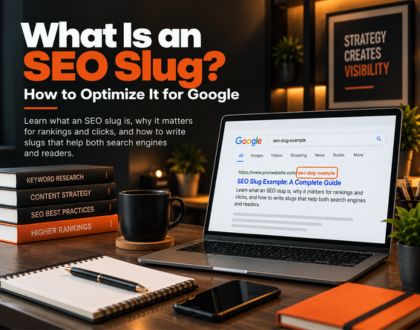
An SEO slug is the final, human-readable part of a web page's URL that identifies the specific page and describes what it contains. In a URL like ,thekaizenglobal.com/seo-services, the slug is seo-services. It sits after the domain name and any folder structure, and it is the one part of a URL that a site owner can fully control and optimize. Slugs look small, often just a few words separated by hyphens, but they carry more weight than their size suggests. A well-written slug helps search engines understand what a page covers, gives readers a preview of the content before they click, and keeps a website's structure clean and organized as it grows. A poorly written slug, full of random numbers or disconnected from the page's actual topic, quietly works against all three.
What Are the Parts of a URL, and Where Does the Slug Fit?
A full URL is made up of several distinct parts, and the slug is only one piece of that structure. Understanding the anatomy makes it easier to see exactly what a slug does and does not control. The protocol, typically https, defines how data moves between a browser and a server. The domain, such as thekaizenglobal.com, identifies the website itself. Any subdirectories or categories that follow the domain establish the site's hierarchy, showing how a page relates to the rest of the site. The slug comes last, identifying the specific page within that structure. Take the URL thekaizenglobal.com/blog/what-is-seo-slug as an example. The protocol is https, the domain is thekaizenglobal.com, blog is the subdirectory, and what-is-seo-slug is the slug. Each layer adds context, but the slug is the layer that speaks most directly to what a visitor will find once they arrive.
Why Slugs Matter for SEO
Search engines like Google read URLs as part of evaluating what a page is about. A slug filled with clear, relevant words gives an early, reinforcing signal about the page's topic, even though Google has been clear that this signal is a minor one on its own. According to Google's own URL structure documentation, using readable words rather than long ID numbers makes pages easier for search engines to interpret and easier for people to trust. That distinction matters. A slug will not compensate for weak content, and stuffing a slug with keywords will not artificially boost rankings. What a good slug does is remove friction. It makes crawling more efficient, makes the page's topic unambiguous, and supports the broader on-page signals, like the title tag and headings, that carry more direct ranking weight. Slugs work best as one piece of a coherent whole rather than as a shortcut on their own. Beyond crawling and indexing, slugs influence something search engines cannot measure directly but still care about: user trust. A visitor scanning search results sees the URL beneath a headline. A clean, descriptive slug signals a legitimate, well-organized page, while a URL full of numbers, session IDs, or unrelated characters can quietly discourage a click even if the page itself is excellent.
Why Slugs Matter for Click-Through Rate
Search results display the URL beneath the title and description, and that URL is often the fastest thing a person scans before deciding where to click. A slug like /best-hiking-boots-for-winter tells a reader exactly what to expect. A slug like /product?id=48213&cat=7 tells them nothing. This difference shows up in click-through rate, the percentage of people who click a result after seeing it in search. Readable, descriptive slugs consistently perform better in this regard, not because Google rewards the slug directly, but because human readers respond to clarity. A slug is effectively free advertising space directly inside the search results page, and wasting it on meaningless characters is one of the most avoidable mistakes a website can make. Social sharing follows a similar pattern. When a link gets pasted into a message, a forum, or a social post without a preview card, the slug is often the only readable part of the link a person sees. A clear slug builds the same kind of trust and clarity in that context as it does in search results.
How Slugs Support Site Structure
Slugs do more than label individual pages. Collectively, they map out how a website is organized. A blog with a consistent, logical slug structure, such as grouping posts under /blog/ or organizing service pages under clear category folders, makes the relationship between pages obvious to both visitors and search engines. This kind of consistency is one of the smaller but recurring items on any thorough technical SEO checklist, since it is easy to overlook during a redesign and expensive to fix once hundreds of pages are already indexed under an inconsistent pattern. This structural clarity has a compounding effect. Search engines use site structure to understand which pages are closely related, which pages sit higher in a topic hierarchy, and how authority should flow between them through internal links. A messy, inconsistent slug structure, where similar content lives under wildly different URL patterns, makes that relationship harder to detect and can dilute the topical signals a site is trying to send. For larger sites, especially ecommerce stores or sites with many locations or service areas, consistent slug patterns also make ongoing SEO work far more manageable. Bulk audits, redirect mapping, and content refresh work all become significantly easier when slugs follow a predictable, logical pattern rather than an ad hoc one. Reviewing slug consistency alongside other elements on an on-page SEO checklist catches these issues before they multiply across dozens or hundreds of pages.
What Makes a Slug SEO-Friendly
A well-structured slug helps search engines and users quickly understand what a page is about.
Keep It Short and Focused
A slug should communicate the page's topic in as few words as possible without losing clarity. Long slugs get truncated in search results and are harder for readers to scan quickly. As a general guideline, three to six words is usually enough to describe most pages accurately. Before: /a-complete-and-detailed-guide-to-choosing-the-best-running-shoes-for-beginners After: /best-running-shoes-for-beginners
Include the Primary Keyword
The main keyword a page targets should appear in the slug, ideally near the beginning. This reinforces topical relevance without requiring keyword repetition elsewhere in the URL. A slug like /seo-writer-guide communicates intent far more clearly than a generic alternative like /post-4471.
Use Hyphens, Not Underscores or Spaces
Search engines treat hyphens as word separators, correctly reading seo-slug-guide as three distinct words. Underscores are often read as a single connected string, and spaces get encoded into unreadable characters like %20. Hyphens remain the standard for a reason: they are the only separator that reliably preserves readability for both people and crawlers. Before: /best_coffee_shops_in_chicago or /best%20coffee%20shops After: /best-coffee-shops-in-chicago
Avoid Stop Words When Possible
Small connective words like and, the, of, and in usually add length without adding meaning to a slug. Removing them, where doing so does not hurt clarity, keeps the slug tighter. A page about the history of content marketing works fine as /history-of-content-marketing without needing every article and preposition preserved. Before: /the-history-and-evolution-of-content-marketing-in-the-digital-age After: /history-of-content-marketing
Use Lowercase Letters Only
Some servers treat URLs as case-sensitive, meaning /SEO-Guide and /seo-guide could technically be read as two different pages. Sticking to lowercase avoids this ambiguity entirely and keeps URLs consistent across a site. Before: /Best-WordPress-Plugins-For-SEO After: /best-wordpress-plugins-for-seo
Avoid Dates in Evergreen Content
A slug like /2023-guide-to-seo can make genuinely current content look outdated the moment the year changes, even after the content itself has been refreshed. For evergreen topics meant to rank over the long term, leaving the date out of the slug allows the page to keep looking current indefinitely, even as the visible publish or update date changes separately. Before: /2023-guide-to-email-marketing After: /email-marketing-guide
Match the Slug to the Final Title Where Practical
The slug does not need to be identical to the page's headline, but keeping them closely aligned reduces confusion for both readers and search engines. A significant mismatch between what a slug promises and what the page actually delivers can hurt trust and increase the chance a visitor bounces immediately.
Common Slug Mistakes That Hurt SEO
Avoiding these mistakes keeps your URLs clear, relevant, and SEO-friendly.
Changing Slugs Without Redirecting
Editing a slug after a page has already been indexed and linked breaks every existing link pointing to the old URL unless a proper redirect is put in place. This is one of the most damaging and most avoidable SEO mistakes, since it can erase months or years of accumulated ranking signals in a single edit.
Using Dynamic Parameters Instead of Static Slugs
URLs like /product.php?id=4471&cat=12 are harder for search engines to interpret and far less trustworthy to readers than a static, descriptive slug. Content management systems that generate parameter-based URLs by default should generally be configured to produce clean, static slugs instead wherever possible.
Duplicate or Near-Duplicate Slugs
When multiple pages end up with identical or extremely similar slugs, whether through translated versions, print-friendly duplicates, or tracking parameters, search engines can struggle to determine which version deserves to rank. This kind of duplication typically calls for canonical tags or consolidation rather than simply hoping search engines pick the right version.
Overloading the Slug With Keywords
A slug like /seo-slug-seo-url-seo-guide-seo-tips reads as spam to both readers and search engines. Modern algorithms are well equipped to recognize this pattern, and it tends to hurt trust and rankings rather than help them.
Ignoring Non-ASCII Characters
For multilingual or international content, slugs containing non-Latin characters need proper UTF-8 encoding to remain crawlable. Google's own documentation explicitly supports localized words in URLs, including transliterated versions, so there is rarely a reason to force non-English content into English-only slugs.
How to Write a Good Slug: A Practical Process
Follow these simple steps to create a clear and SEO-friendly slug.
Step 1: Identify the Primary Keyword
Before writing anything else, confirm the exact keyword or phrase the page is targeting. This keyword should anchor the slug the same way it anchors the title tag and the page's main heading.
Step 2: Draft a Short, Descriptive Phrase
Turn the keyword into a natural, readable phrase rather than a robotic keyword string. The goal is a slug a person could read aloud and immediately understand, not a list of terms strung together.
Step 3: Trim Unnecessary Words
Remove articles, prepositions, and filler words that do not add meaning. Compare the length against similar pages already on the site to keep formatting consistent.
Step 4: Check for Duplicates
Search the site's existing URLs to confirm the proposed slug is not already in use, even in a slightly different form. Duplicate or near-duplicate slugs create the kind of confusion search engines and readers both struggle with.
Step 5: Finalize and Lock It In
Once a slug is set and the page is published, treat it as permanent. Changing it later carries real risk, covered in more detail below.
Slugs and Content Refresh
When existing content gets updated or expanded, it can be tempting to update the slug along with everything else. In most cases, this is a mistake. A slug that has already accumulated backlinks, search rankings, and social shares carries real equity that a slug change puts at risk, even with a redirect in place, since redirects can dilute some ranking signals and take time to fully pass authority. The safer approach is to treat the slug as a stable identifier separate from the content itself. Titles, headings, and body copy can all be refreshed and expanded freely. The slug should only change when the original one was genuinely broken, misleading, or built around the wrong keyword entirely.
Slugs for Different Page Types
The best slug for a page depends heavily on what kind of page it is. A pattern that works well for a blog post can be the wrong choice for a product or category page, so it helps to think through each type on its own terms.
Blog Posts
Blog posts generally benefit from slugs that closely mirror the primary keyword, since informational content is judged heavily on topical match. Keeping the slug close to the exact phrase a reader would search for gives the clearest possible signal about what the post answers.
Product Pages
Product pages often work best with the product name itself as the slug, kept short and specific. This keeps the URL recognizable and easy to share, especially for products with distinct, searchable names.
Category and Hub Pages
Category or hub pages should use broad, umbrella terms that clearly describe the group of content beneath them. These slugs need to stay relevant even as individual pages under that category change over time, so it is worth choosing a term general enough to still make sense a year or two later.
Service Pages
Service pages, particularly for local or location-based businesses, often perform well when the slug includes both the service and, where relevant, a location, such as /seo-services-chicago. This pattern helps search engines connect the page to relevant local search intent without requiring the location to appear awkwardly in the page's main heading.
How to Edit an SEO Slug on Popular Platforms
The general best practices above apply everywhere, but the actual steps to change a slug differ by platform. Here is how it works on three of the most common ones.
How to Edit a Slug in WordPress
WordPress generates a slug automatically from the page or post title, but it can be edited manually. In the Gutenberg block editor, the Permalink section in the sidebar includes an editable URL slug field. In the Classic Editor, the same option appears just below the title as an "Edit" link next to the Permalink. For quick changes across many posts at once, the Quick Edit option in the Posts or Pages list also includes a slug field. Categories, tags, and custom taxonomies each have their own separate slug field on their respective edit screens.
How to Edit a Slug in Shopify
Shopify calls this field the URL handle rather than a slug, but it works the same way. From the Shopify admin, open the relevant product, collection, or page, then scroll to the Search engine listing section and click "Edit website SEO." The URL and handle field there controls the slug. Shopify keeps the leading path (/products/, /collections/, or /pages/) fixed, so only the text after that prefix can be customized. When changing an existing handle, checking the "Create a URL redirect" box prevents the old link from breaking.
How to Edit a Slug in Wix
In the Wix Editor, open Pages & Menu, click the more-actions icon next to the relevant page, and select SEO Basics. The URL slug field sits alongside the title tag and meta description fields in that panel. For blog posts specifically, the same options appear under the SEO tab within the Blog dashboard. Wix automatically sets up a redirect from the old URL to the new one whenever a slug changes through these settings, though that behavior can be turned off in favor of a manually configured redirect if needed.
A Quick Comparison of SEO Platforms
| Platform | Where the Slug Field Lives | What It's Called | Redirect Handling |
|---|---|---|---|
| WordPress | Permalink section (Gutenberg) or below the title (Classic Editor) | Permalink / URL Slug | Manual, requires a plugin or server-level redirect |
| Shopify | Search engine listing → Edit website SEO | URL and Handle | Built-in checkbox: "Create a URL redirect" |
| Wix | Pages & Menu → More Actions → SEO Basics | URL Slug | Automatic by default, can be disabled |
Shopify and Wix both build redirect handling directly into the slug-editing interface, while WordPress leaves it to the site owner unless a redirect plugin or server rule is already in place. That difference is worth knowing before changing any slug on a WordPress site specifically, since it is the one platform of the three where forgetting a redirect is entirely possible.
The Kaizen Global Slug Audit Checklist
The best practices above work well when reviewing a single page. For a full website audit, it is better to follow a consistent process. Here is the step-by-step process Kaizen Global's team uses to audit the slugs across an existing website:
- Pull every indexed URL using Search Console or a crawler, not just the site's navigation menu, since orphaned or unlinked pages often carry the worst slugs.
- Flag anything with parameters, IDs, or session strings and prioritize those first, since they carry the highest crawl and trust cost.
- Group similar pages and compare slug patterns side by side to catch inconsistency, such as some blog posts living under /blog/ and others under /articles/.
- Check for duplicate or near-duplicate slugs across language versions, print pages, or old campaign landing pages that were never cleaned up.
- Cross-reference high-traffic pages against their slugs specifically, since these are the pages where a slug change carries the most risk and therefore deserve the most caution before any edit.
- Document every redirect already in place before making changes, so a new edit does not create a redirect chain on top of an existing one.
Most websites do not need every slug rewritten. A thorough audit usually reveals a few problematic patterns that need attention, while most slugs are already effective and should be left unchanged.
Frequently Asked Questions
Is a slug the same thing as a URL?
No. A slug is only the final segment of a URL, the part that identifies a specific page. The full URL includes the protocol, domain, and any subdirectories in addition to the slug.
What's the difference between a slug and a permalink?
A permalink is the full, permanent URL of a page, protocol, domain, and slug included. The slug is just the final piece of that permalink. Most content management systems let you edit the slug directly while generating the rest of the permalink automatically.
Does slug length directly affect rankings?
Not directly. Google has not confirmed slug length as a ranking factor on its own, but excessively long slugs can get truncated in search results and are harder for readers to scan, which indirectly affects click-through rate and user experience.
Should numbers ever appear in a slug?
Numbers are fine when they are genuinely part of the topic, such as a slug like /10-seo-tools-for-2026 for a listicle. They become a problem when they are meaningless identifiers, such as database IDs, with no relevance to a reader.
Do slugs matter for voice search or AI-generated answers?
Slugs play a smaller direct role in voice search and AI Overviews compared to structured content and clear headings, but a clean, descriptive URL still supports the overall page clarity that these systems favor when selecting sources to cite.
Get Slug and URL Structure Right With Kaizen Global
Small technical details like slug structure often make the difference between content that ranks consistently and content that struggles despite strong writing. Kaizen Global's team builds clean, consistent URL structures into every project from the start, combining technical SEO discipline with the kind of content strategy covered throughout this guide. Businesses looking to clean up their site's URL structure or strengthen their broader SEO strategy can explore Kaizen Global's SEO services or Content Writing Services, or schedule a consultation to discuss specific goals. Questions can also be submitted directly through the contact form for a prompt response from the team.
Get Slug and URL Structure Right With Kaizen Global
Insights

Mobile Seo Checklist - A Complete Guide
Mobile SEO refers to optimizing your website to ensure it performs well on mobile devices, offering a seamless user experience ...

25-Step SEO Migration Checklist
Migrating your website can feel like a daring task filled with potential challenges. No matter if you're redesigning your site ...
Local SEO Checklist: Maximize Your Local Reach
Local search engine optimization (SEO) has become essential for businesses aiming to connect with their community and attract nearby ...